
Execution Flow
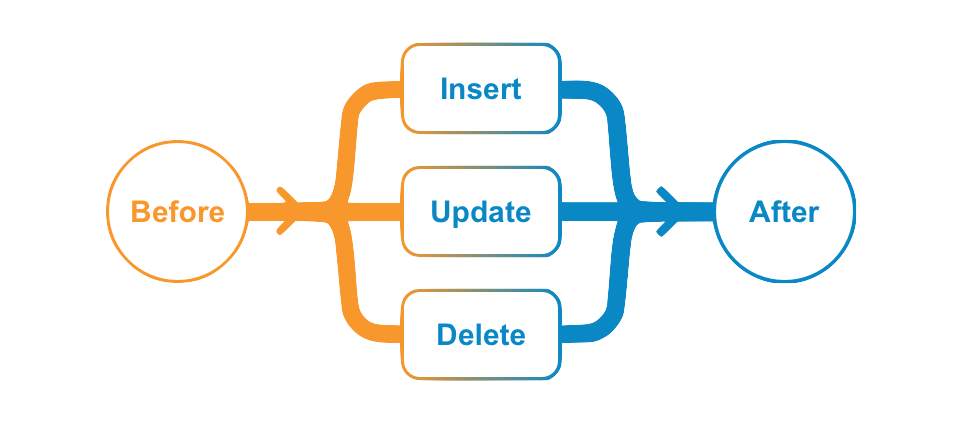
When a user initiates a request (INSERT, UPDATE, or DELETE) such as clicking Save in UI or sending a POST with Vault API, the system processes the request by firing the BEFORE event triggers first, then committing data to the database, and then firing the AFTER event triggers.
BEFORE triggers are often used for defaulting field values and validating data entry, whereas AFTER event triggers are mostly used to automate creating other records or starting workflow processes.
Trigger Order and Nested Depth
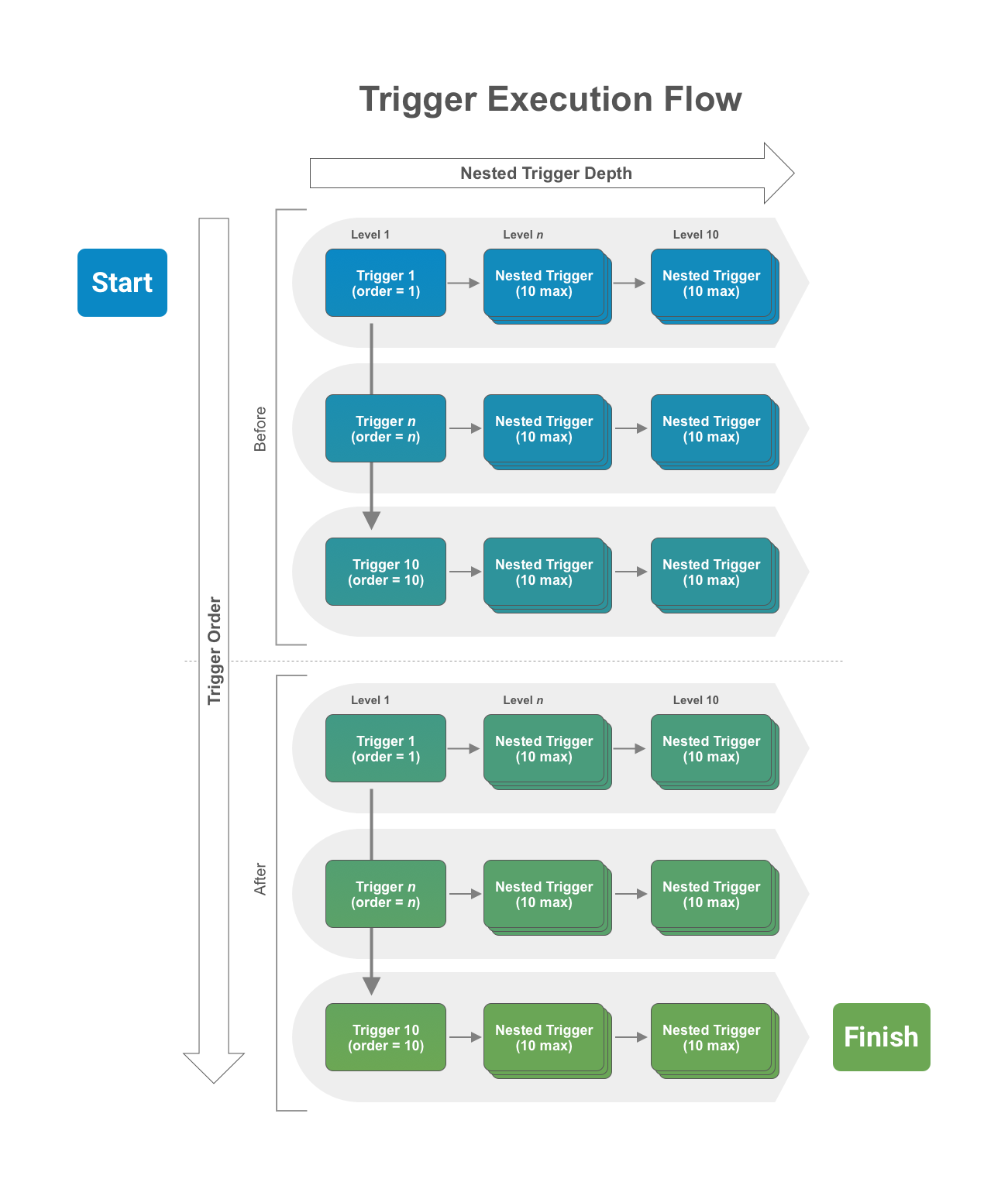
Section link for Trigger Order and Nested DepthA limit of 10 triggers are allowed in each event and the order of execution can be specified. That means BEFORE and AFTER events each have their own limit of 10 triggers allowed. In addition, when any given trigger executes, it can cause other triggers (nested triggers) to fire when it either performs a role a assignment or a data operation (INSERT, UPDATE, DELETE) programmatically. The nested trigger depth cannot exceed 10 levels deep.
To summarize, when a user initiates a request (for example, INSERT), the BEFORE event triggers (up to 10) will execute in order. If any of the triggers cause other triggers to fire, the nested triggers will execute (up to 10 nested levels). After the system finishes the BEFORE triggers, the data with any changes made by the executed triggers persists, and the AFTER event triggers will fire in the same manner with trigger order and nested depth. The image below illustrates this execution flow.
If you need to share data between different triggers or actions in the same transaction, you can do so with RequestContext.
System-Initiated Requests
Section link for System-Initiated RequestsGenerally, triggers fire when a user initiates a request. When the System updates records, such as Lookup Field updates, triggers do not fire.
When working with record triggers, when the System performs a Hierarchical Copy (deep copy), the insert operation will not fire any triggers.
Similarly, when working with doctype triggers, when the System deletes all document versions as a result of deleting a single document, the delete operation fires one document-level delete event and does not fire additional triggers for each deleted document version.
Terminating Execution
Section link for Terminating ExecutionThe trigger execution flow described above represents a transaction. In some cases, it is necessary to cancel the entire INSERT request and rollback any changes. Developers can throw a RollbackException in any trigger in the transaction, and execution will terminate immediately and roll back all changes.
Note that calling RecordChange#setError or RecordRoleChange#setError will not terminate a transaction. Instead, the trigger which caused the error will fail and the rest of the transaction will continue. In order to terminate an entire transaction, you should always throw a RollbackException.
The system will also terminate execution and rollback a request when errors occur, such as missing required field value on INSERT or exceeding allowed elapsed time limit (100 seconds).
Asynchronous Services
Section link for Asynchronous ServicesCalls to asynchronous services such as JobService or NotificationService will execute only when the request transaction completes. This way, you can use a RollbackException to stop the transaction if necessary, preventing asynchronous services from executing unintentionally when rolling back a transaction. For example, if a DELETE event trigger calls NotificationService to send a notification, but a nested trigger later rolls back the transaction, the system should not delete the record nor send the notification. This prevents the asynchronous notification process from executing erroneously. Once the entire transaction completes successfully, all queued asynchronous services execute immediately.